- ai
- feature
- product
Describe a trading strategy in English. Watch the canvas build itself.
The Backticks AI assistant turns a sentence into a working strategy graph — typed indicator and signal nodes you can edit by hand, not a black box of generated code.
The hardest moment when starting a trading strategy isn’t the maths. It’s the blank canvas.
You know what you want — “Bollinger mean-reversion with a trend filter”, “RSI 14, long under 30, short over 70”, “buy a breakout above the 20-day high but only when ATR is rising”. Translating that into a wired-up graph of indicators, signal nodes, position sizing, and risk rules is a tax on every iteration. People bounce off it.
The Backticks AI assistant removes the blank canvas.
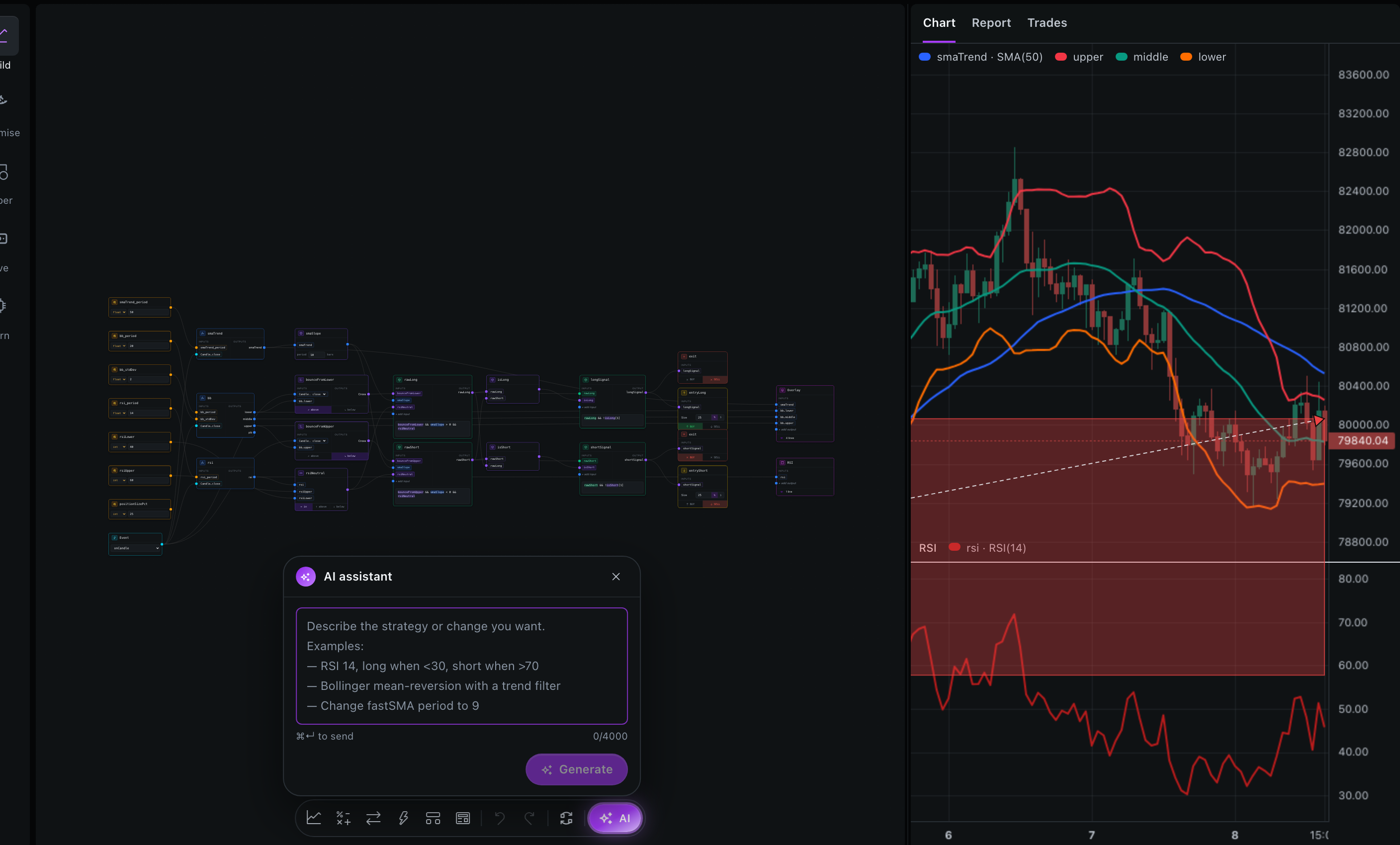
What it does
Type a sentence. The assistant builds the corresponding strategy graph directly on the canvas:
- It picks the indicator nodes (RSI, Bollinger, SMA, MACD, ATR — whatever the description implies).
- It wires their outputs into signal logic:
crossUp,crossDown, threshold comparators, AND/OR gates. - It adds entry and exit action nodes with sensible default sizing.
- It labels and groups the nodes so the strategy’s shape is visible at a glance.
- It returns a short explanation of what it built and why.
No wall of code. No black-box config blob. A graph you can edit, prune, swap, or extend by hand.
Why a graph, not code
A tempting alternative would be to ask a language model to write strategy code and execute it. Backticks deliberately doesn’t do that.
Two reasons:
Every decision the strategy makes should be inspectable. Code is opaque to anyone who isn’t fluent in TypeScript. The graph isn’t — every indicator, every condition, every order, every risk filter is a labelled node with typed inputs and outputs. Step into a backtest, see which node fired, and the why of any trade is right there. Code-mode AI strategies fail this bar instantly.
Graphs validate before they run. Each node has typed handles. If the AI miswires an output (say, feeds a numeric series into a boolean port), the graph refuses to compile and surfaces a readable error. Generated code can be subtly wrong in ways that only fail at runtime, deep into a 20-minute backtest.
The graph is the interface. The AI is just a faster way to lay out the first draft of one.
What the assistant knows about
Internally the assistant works against the same node catalogue available in the studio. It knows:
- The full list of node types — indicators, conditions, mathematical operators, actions, risk filters — each with typed input/output handles.
- A small set of canonical strategy patterns it can compose: mean-reversion, breakout, momentum, multi-timeframe filter, exit strategies.
- The target symbol and timeframe currently active on the canvas.
The output is a graph descriptor — nodes, edges, parameter values — which the studio deserialises into actual canvas nodes laid out automatically. What lands on the canvas is a regular Backticks graph; nothing in it is “AI-only” or hidden.
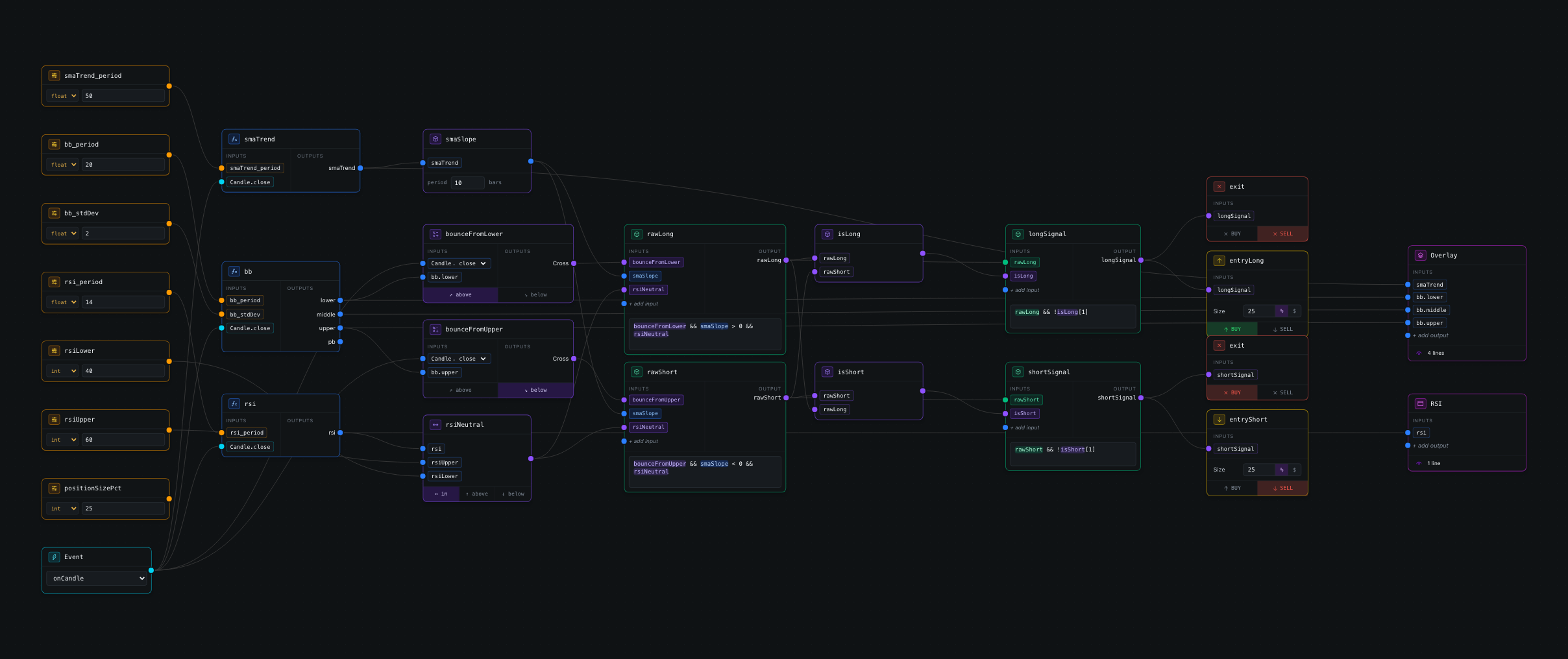
That detail matters: once the assistant places the graph, the relationship with the model ends. The strategy runs on the same deterministic engine that powers the rest of Backticks, so the result on screen is exactly what a hand-built version of the same graph would produce.
Where it shines, where it doesn’t
Strong fit:
- Scaffolding the first draft. “RSI 14 with a 200-period EMA trend filter, longs only” → graph and a backtest in 30 seconds.
- Explaining shape. Newcomers can ask “why does Bollinger mean-reversion need a trend filter?” and watch the assistant add (or remove) nodes with reasoning attached.
- Finding the right node. Backticks ships a deep indicator catalogue. “What’s an Aroon and how would I use it?” lets a user see the node, instead of searching docs.
Deliberately not the goal:
- Inventing edge. No language model has alpha. The assistant builds the strategy described — it doesn’t second-guess the edge, it doesn’t recommend “what works”, it doesn’t hallucinate a Sharpe-2 strategy. The risk-of-snake-oil stays with the human.
- Managing optimisation. Parameter search lives in the optimiser tab, not the assistant. “Find the best RSI period” is a job for the genetic optimiser, not a prompt.
How credits work
The assistant calls expensive language models, so it’s the one paid feature in Backticks. Everything else — strategy authoring, backtesting, the optimiser, paper trading — runs on the user’s CPU and is free.
It’s sold as AI credits, not a subscription:
- Every new account starts with 25 free credits — enough to scaffold a first strategy.
- Top-ups are pay-as-you-go bundles, no recurring billing.
- Each AI request costs a small fixed credit amount, deducted only when the change is applied.
If the assistant isn’t used, no paywall ever shows up. If it is, the only cost is per request.
Try it in the demo — type a strategy in plain English and watch the canvas wire itself. Then edit the graph by hand, the way you’d want to.